Project export quickstart
Turn a model you trained in Kayra into a small Python project that runs anywhere: an HTTP API, a batch scoring command for CSV/Parquet files, or both. The project does not need the Kayra server, a database or Databricks.
This page walks through the whole flow once. The project export reference covers every option in detail.
How it works
flowchart LR
    A["Build a pipeline<br/>on the canvas"] --> B["Train or tune"]
    B --> C["Model Registry:<br/>Export project"]
    C --> D["ZIP file"]
    D --> E["Install in a fresh<br/>environment"]
    E --> F["smoke_test.py"]
    F --> G["API: uvicorn app:app<br/>POST /predict"]
    F --> H["Batch: batch.py<br/>CSV / Parquet"]
    F --> I["Docker image<br/>starting point"]
The ZIP freezes the fitted model and its fitted preprocessing. Retraining or changing thresholds in Kayra later does not change a project you already downloaded; export again to pick up a new version.
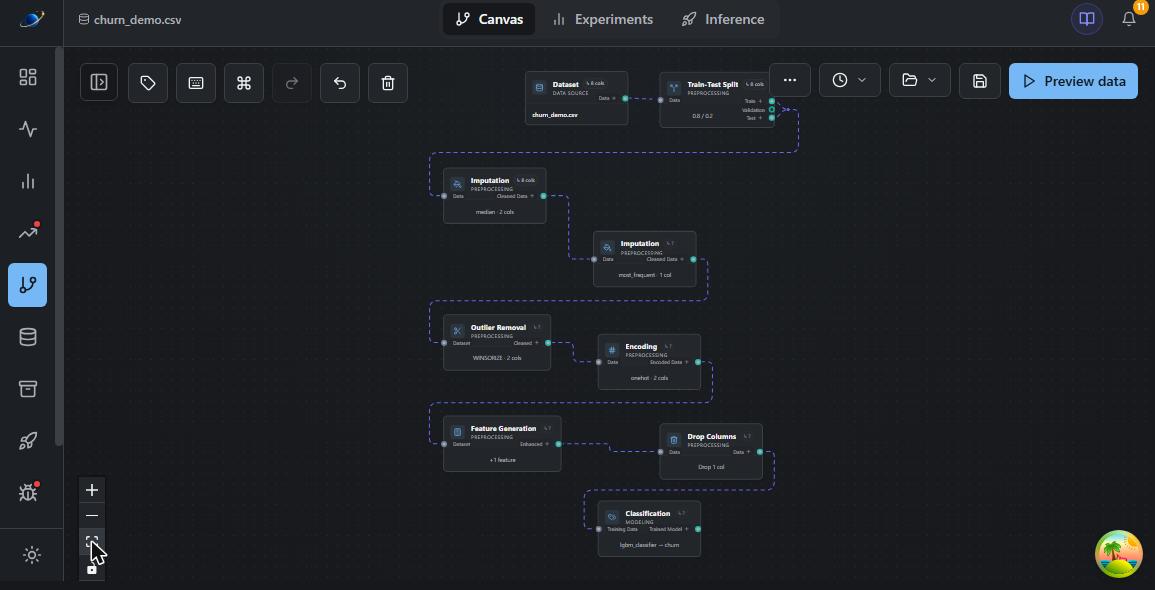
1. Build and train a pipeline
Supported canvas pipelines use preprocessing that works row by row. For example: imputation, outlier handling, one-hot encoding, date features, column drops, scaling and a classifier or regressor, trained in Basic or Advanced (tuning) mode. See What it does not do for restrictions, including steps that require custom project code.
2. Export from the Model Registry
- Open Model Registry and click View Versions for your model.
- Pick the format: API + batch, API only or Batch only.
- Click Export project.
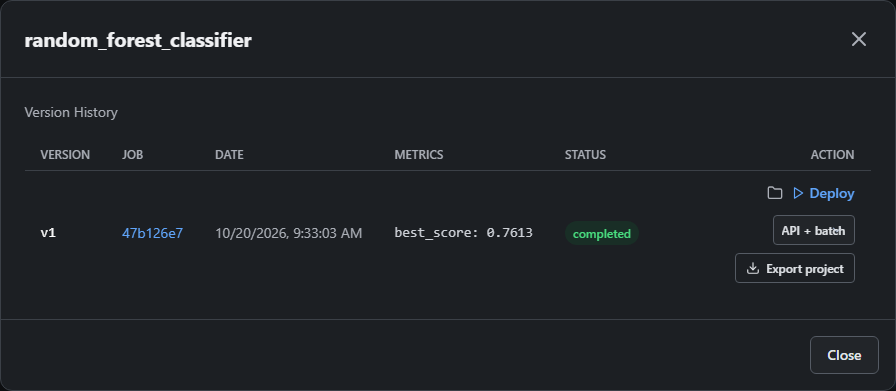
Your browser may ask where to save the ZIP. If the model cannot be exported (see What it does not do), the reason appears under the button instead.
3. What is in the ZIP
kayra_model_<job-id>.zip
├── model.pkl              fitted model + preprocessing (checksum in manifest.json)
├── scoring.py             shared prediction code used by API and batch
├── app.py                 FastAPI service (API modes)
├── batch.py               CSV/Parquet scoring command (batch modes)
├── schema.json            raw input columns and their training types
├── manifest.json          job id, version, Python version, pins, checksums
├── requirements.txt       exact package versions
├── wheels/                the matching skyulf-core wheel
├── example_request.json   request shape with placeholder values
├── smoke_test.py          load check, optional test request
├── Dockerfile             container starting point
└── README.md              commands for this export mode
4. Install and check
Use the Python version recorded in manifest.json, in a new environment:
uv venv
uv pip install -r requirements.txt
uv run --no-project python smoke_test.py
requirements.txt installs skyulf-core from the bundled wheels/ folder, so it
works even when that exact Core version is not on PyPI. Keep wheels/ next to
requirements.txt.
5. Serve the API
uv run --no-project uvicorn app:app --host 127.0.0.1 --port 8000
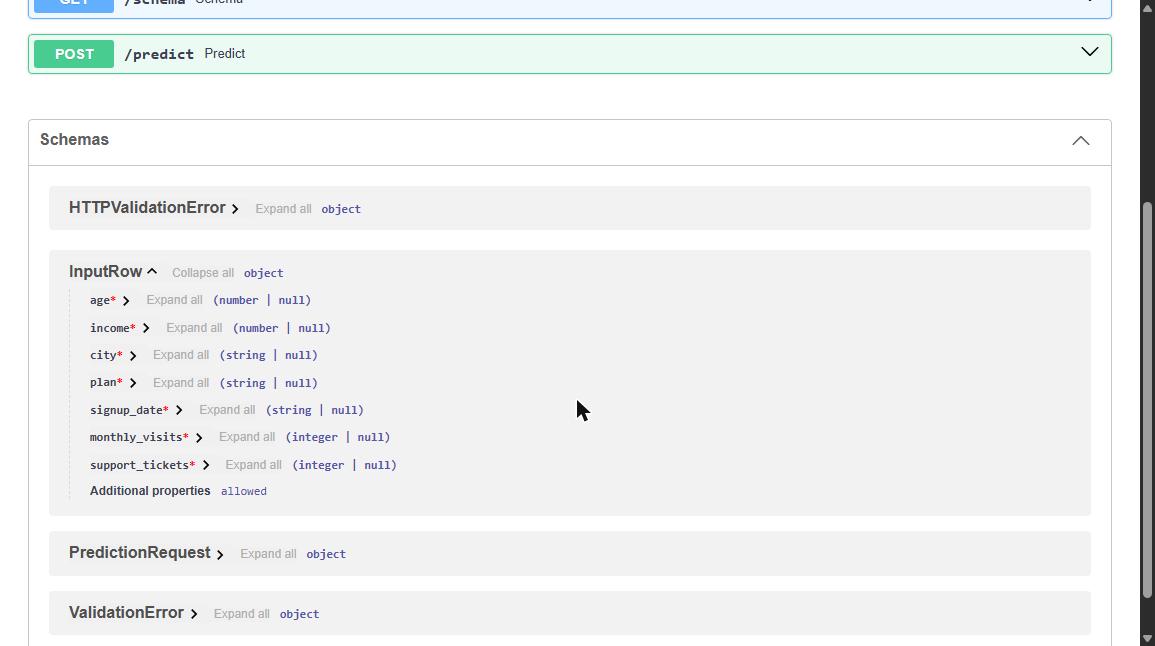
Open http://127.0.0.1:8000/docs. Swagger lists your model's real input columns
with their types:
What happens on each /predict call:
sequenceDiagram
    participant Client
    participant API as app.py
    participant S as scoring.py
    Client->>API: POST /predict {"data": [raw rows]}
    API->>S: rows
    S->>S: check required columns and convert to training types
    S->>S: apply fitted preprocessing (imputation, encoding, ...)
    S->>S: outlier filters mark rejected rows as excluded
    S->>S: model predicts eligible rows, saved thresholds applied
    S-->>API: labels, probabilities, status per row
    API-->>Client: 200 JSON, or 422 with the invalid column
Send raw columns, exactly as in your training data, before encoding or scaling:
curl -X POST http://127.0.0.1:8000/predict \
  -H "Content-Type: application/json" \
  --data-binary @example_request.json
Classifiers return a label for each eligible row and, when the model supports them, class probabilities. Excluded rows have null predictions and probabilities:
{
  "predictions": ["yes"],
  "probabilities": [{"no": 0.26, "yes": 0.74}],
  "model_version": "the-exported-training-job-id",
  "thresholds_applied": null
}
Replace the placeholder values in example_request.json before using it; they
only show the request structure.
6. Score files in batch
uv run --no-project python batch.py --input customers.parquet --output scored.parquet
The output keeps every input row and column in the original order and adds
prediction, plus prediction_proba_<class> columns for classifiers that support
probabilities. Large files
are processed in chunks (--chunk-size, default 10,000 rows). The output file is
only replaced when the whole run succeeds.
Running it on a schedule
The project has no scheduler. Run the batch command from the one you already use, for example a nightly cron entry:
0 2 * * * cd /opt/churn-model && .venv/bin/python batch.py --input /data/today.parquet --output /data/scored/today.parquet
In Airflow use a BashOperator with the same command; on Databricks, run it as a
Python script task with the project files uploaded to the workspace.
Rows removed by outlier filters
If the pipeline contains an outlier filter that removes rows (IQR, Z-Score, Elliptic Envelope, Isolation Forest, Local Outlier Factor, Manual Bounds) or a Box-Cox Power Transformer, the project applies the same fitted filter to new data. A rejected row is never dropped. It stays in place without a prediction:
{
  "predictions": ["no", null, "yes"],
  "scoring_status": ["predicted", "excluded", "predicted"],
  "exclusion_reason": [null, "outlier:IQR", null]
}
The reason names the filter that rejected the row (outlier:<filter> or, for a
Box-Cox transformer that cannot handle a value, invalid:PowerTransformer).
Batch output gets the same scoring_status and exclusion_reason columns. These
fields only appear for pipelines that contain such a filter. Winsorize and Clip
to Fixed Bounds cap values instead and never exclude rows.
What it does and does not do
What it does
| Included | Details |
|---|---|
| HTTP API | /predict, /health, /schema, /docs with typed inputs |
| Batch scoring | CSV and Parquet, chunked, order-preserving, atomic output |
| Probabilities | per class, for classifiers that support them |
| Input checks | required columns, conversion to training types, clear 422 errors |
| Saved thresholds | tuned thresholds enabled at export time are applied |
| Outlier exclusions | rejected rows kept with scoring_status and a reason |
| Portable install | bundled skyulf-core wheel, pinned dependencies, Dockerfile |
What it does not do
| Not included | Use instead |
|---|---|
| Scheduling | cron, Airflow, Databricks jobs (see above) |
| Drift and performance monitoring | Kayra's Data Drift pages or the Databricks template |
| Retraining | retrain in Kayra and export the new version |
| Authentication | put the API behind your own authenticated gateway |
| Reading from databases | load your data to CSV/Parquet or call the API |
The export button refuses pipelines it cannot reproduce exactly outside Kayra. Use the canvas's notebook export for these:
- lag, rolling-window and other history-dependent time-series features
- project code nodes (
ColumnFunction,FittedFunction,RowFilterFunction) sentence_embeddertext embeddings- unsupervised models and model sets
- older models trained before raw input schemas were recorded (retrain once)
The Dockerfile is a starting point: build and validate the image on your own platform before deploying it.
Troubleshooting
| Symptom | Cause and fix |
|---|---|
| Error under Export project | The pipeline contains a step from the list above; the message names it. |
uv pip install cannot find skyulf-core |
wheels/ was not kept next to requirements.txt. |
Model checksum mismatch |
model.pkl changed after export; download the ZIP again. |
| API returns 422 | A required column is missing or a value does not match its training type; the message names the column. |
| Some rows have no prediction | They were rejected by an outlier filter; check exclusion_reason. |
Only load projects from people you trust: model.pkl is a pickle file and can
run code when loaded. The fitted model can also contain learned values from your
training data, so treat the ZIP as a sensitive artifact.